
Smart Tutor for SAMSUNG Mobile
Screenshots
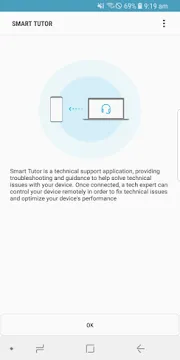
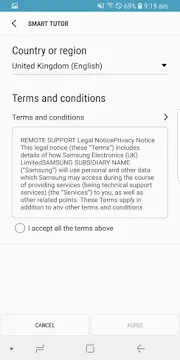
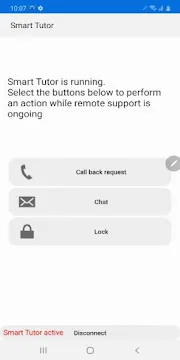
Smart Tutor for SAMSUNG Mobile is a helpful remote support solution for your smartphone. This software connects you directly to a trained tech expert. You can get real-time assistance for various phone issues. For instance, the expert can diagnose software errors. They can also optimize your device settings. You do not need to visit a physical repair shop. Therefore, you save a lot of time and effort. Many smartphone owners face complex configuration problems. This tool simplifies the entire troubleshooting process. You just download the safe APK file to begin. Then, you can request immediate help from a specialist.
The remote connection process is very straightforward. You do not need technical skills to use it. The assistant guides you through every step. Consequently, anyone can fix their phone quickly. Whether you have a new or old phone, this service helps. It bridges the gap between users and complex technology. You can learn a lot from watching the expert work. Thus, it acts like a personal tech guide in your pocket.
What is Smart Tutor for SAMSUNG Mobile?
Smart Tutor for SAMSUNG Mobile functions as a highly secure remote diagnostic tool. This software allows official Samsung technicians to view your device screen. However, they can only control it with your explicit permission. They can solve software bugs and manage email accounts. Additionally, they help you configure advanced device settings. You always maintain absolute control during the active session. For example, you can terminate the connection instantly. The expert cannot see your private folders unless you allow it. Therefore, your personal photos and private text messages remain completely safe.
This support option helps millions of device owners worldwide. It resolves common complaints about battery drain and slow performance. First, you open Smart Tutor for SAMSUNG Mobile on your device. Second, you contact the customer care center. Finally, you enter the unique six-digit pin code. The remote session begins right after these basic steps. It is a highly efficient way to receive professional support. You do not have to wait in long lines at service centers.
Furthermore, the software adapts to your specific device model. It works well on both premium and budget phones. The technicians know exactly how to handle every model. They use advanced diagnostic features to locate deep system errors. Then, they apply the correct patches to fix them. This method ensures your phone operates correctly. It eliminates guesswork from the repair process entirely.
Key Features of This Remote Support Tool
This unique support tool offers several exceptional features for smartphone users. First, it provides real-time screen sharing. The technician checks your screen to identify software glitches. Second, it features a built-in text chat. You can communicate with the agent throughout the session. Third, it allows remote app management. The expert can remove corrupted apps that cause crashes. Moreover, it includes a helpful file transfer option. The support agent sends system fixes directly to your phone storage.
Here is a list of problems this service can fix:
- System updates and operating system installation faults.
- Samsung account creation and data synchronization errors.
- Extreme battery drain and unusual app freezes.
- Screen brightness adjustments and display calibrations.
- Data backup procedures and full factory restorations.
- Wi-Fi connection errors and Bluetooth pairing issues.
All these features operate together to create a smooth experience. You get professional tech support right from your couch. Consequently, your smartphone runs much faster after the session. You do not need to pay expensive diagnostic fees. The service focuses entirely on user convenience and fast resolution.
Why You Should Download Smart Tutor for SAMSUNG Mobile APK
You should download the Smart Tutor for SAMSUNG Mobile APK for many reasons. Sometimes, the official store does not show this software in your region. Therefore, downloading the APK file offers a perfect alternative. It gives you instant access to the latest software version. You can resolve urgent smartphone errors without any delay. Furthermore, the APK file installs easily on older phone models. It helps you maintain older devices with professional assistance.
Many advanced users prefer manual installations because it gives them control. However, you must acquire the file from a clean source. Our website provides a highly secure and verified download link. We scan every single file to ensure zero malware threats. Thus, your smartphone remains safe from dangerous viruses. You can complete the installation process within a couple of minutes. Then, you can enjoy all the benefits of expert guidance.
Here is a list of benefits when using our APK:
- Fast download speeds without any hidden subscription costs.
- Full compatibility with multiple generations of devices.
- Clean installation files without annoying adware or trackers.
- Access to the tool even without a Google account.
- Easy sharing of the installation file with friends.
These advantages make the APK download a smart choice. It ensures you always have a backup plan for phone emergencies. You can keep the file in your storage for future use.
How to Use the Service Safely
Safety is very important when you share your private phone screen. Smart Tutor for SAMSUNG Mobile includes many privacy protection settings. First, you should close all personal apps before the session starts. Hide your mobile banking tools and private messaging apps. Second, you can monitor the technician’s actions in real time. You will see every setting they open on your display. Third, never reveal your personal lock screen passwords to anyone. The expert can fix your device without knowing your passwords.
Moreover, the system uses strong encryption for all transmitted data. Outside hackers cannot spy on your active remote connection. Once the session ends, the connection closes for good. The technician cannot access your device again without a brand-new code. Therefore, you retain full privacy at all times.
Let us look at some safety habits to remember:
- Only start sessions when you actually call official support.
- Do not accept random connection requests from unknown sources.
- Stay near your phone to watch the entire process.
- Read the permission prompts carefully before tapping agree.
- Report any suspicious behavior to the main customer service.
By following these basic tips, you protect your identity. You get the help you need without risking your personal data. Security remains a top priority for this software system.
How Smart Tutor for SAMSUNG Mobile Solves Tech Issues
Smart Tutor for SAMSUNG Mobile solves tech issues by performing deep system analysis. The technician reads your system logs to find hidden errors. Then, they clear corrupted cache files that slow down your phone. This action recovers a lot of free storage space. Consequently, your phone stops lagging during heavy multitasking. They can also turn off unnecessary background processes. This configuration improves your battery life over the day.
Many users struggle with setting up their corporate email accounts. The expert sets up your email accounts step by step. They also activate essential security options like facial recognition. Because of this direct help, you learn more about your device. You understand how to manage your device features better. It prevents future errors from happening again.
Furthermore, the technician can reset network settings to fix signal drops. They can diagnose why your Wi-Fi keeps disconnecting. They can also fix synchronization errors with cloud storage. This comprehensive approach covers almost all software problems. It gives your smartphone a thorough tune-up. You get a fresh phone experience without data loss.
System Requirements and Installation Tips
Before you install the file, verify your device specifications. Smart Tutor for SAMSUNG Mobile requires a continuous internet connection to work. A fast Wi-Fi connection ensures smooth screen transitions. Mobile networks also work, but they use up your data allowance. Your smartphone must run a compatible operating system version. Most recent devices handle this software without any performance lag. Additionally, the software requires minimal storage space. The download file is extremely small and lightweight.
Please follow these steps for a successful setup:
- Get the clean APK file from our download page.
- Go to settings and allow installations from unknown sources.
- Locate the downloaded file in your file manager.
- Tap the file to trigger the installation process.
- Open the software and choose your preferred language.
- Accept the terms of service to reach the main menu.
These basic steps ensure a hassle-free installation experience. After completion, you are ready to connect with the help desk. The software remains quiet in the background until you need it. It does not waste your battery when idle.
Conclusion
Smart Tutor for SAMSUNG Mobile offers an incredible method to care for your smartphone. It removes the stress of handling complicated technical errors alone. You get a direct link to professionals who know your phone perfectly. Therefore, you can fix bugs safely and efficiently. Download the clean APK file from our site today to boost your phone. It is a completely free solution for every device owner.